# Activities
* There are ***four*** key components in an Android application, and half of the vulnerabilities are related to network traffic (e.g., HTTPS) while the other half involves the four components **(Activities, Services, Broadcast Receivers, Content Providers)**
## 📌Activities
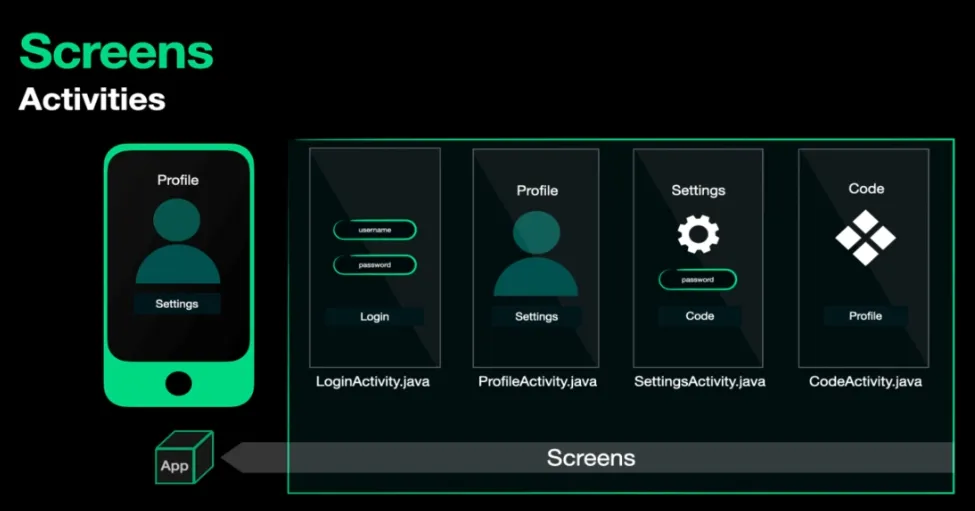
* An activity represents a single user interface screen. It’s the primary way that users interact with your app.
* Each screen or “activity” in your app is typically represented by a separate activity component.
* Activities can be used to display information, gather user input, and respond to user interactions. They’re the basic building blocks of the user interface.
* Activities can launch each other like in this example the code activity has a button that launches the profile activity and the profile activity can launch the settings activity.
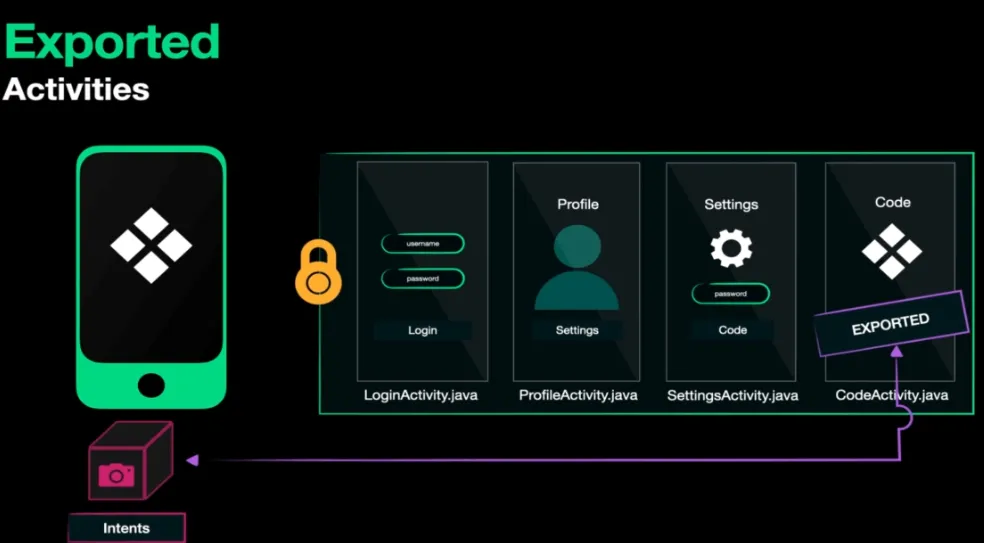
* **Activities are protected by the application context** and **cannot** be launched by another app **unless** they are explicitly marked as **`exported="true"`** in the **`AndroidManifest.xml`**.
* Now, let's say I have an application that includes a **QR code** scanner, and I want to access this activity but not the app itself. How can the OS access an activity?
* Let's go back to **`androidmanifest.xml`**.

### 📍 **So what is exported and intent-filter?**
An “**`exported`**” activity in Android *refers to an activity component that can be accessed and launched by other apps or components outside of its own app*. When an activity is marked as “**`exported=true`**” It means that other apps can potentially interact with it, start it, and communicate with it.
***That means if the QR code scanner activity is exported, I can start it and scan the code without opening the application.***
📍 ***We have two types of exporting an activity explicit and implicit.***
1. To determine if an activity is exported in an Android application, you can look at the ***Android manifest XML*** file, specifically at the **activity’s** declaration. Within the `` element, there is an attribute called `android:exported`. This attribute indicates whether the activity is accessible to other applications or components outside of the app. ***(explicit)***
* ***For example:***
```xml
```
* In the above example, the **`MainActivity`** activity is exported (**`android:exported="true"`**), meaning it can be launched by other applications. If **`android:exported`** is set to **`"false"`**The activity is not exported and can only be launched within the app.
2. Regarding ``It is used within the `` element to specify which types of intents the activity can respond to. Intents are messages that allow components to request actions from other components or apps. ***(implicit)***
* ***For example:***
```xml
```
* In this example, the `MainActivity` is defined as the main launcher activity (`android.intent.action.MAIN` and `android.intent.category.LAUNCHER`), which means it will be the entry point of the application when the user opens it from the app launcher.
> **By checking both the `android:exported` attribute and `` of an activity in the Android manifest, you can identify if the activity is exported and understand its launch behavior in the application.**
### 📍How to start an activity
* ***Using ADB:***
```bash
adb shell am start -n package_name/activity_name
#am start-activity -n package_name/activity_name
```
* If you explain this to the customer, you should mention that an attacker needs access to the ADB shell to use the activity manager and start the app. The customer may argue that this is not considered a security finding.
* To demonstrate a more practical scenario, you could create a malicious app that performs this task to start an activity without requiring access to the ADB shell.
```java
// Code to start the activity:
Intent intent = new Intent();
ComponentName componentName = new ComponentName("com.nvr.example.sieve", "com.nvr.example.sieve.PWList");
intent.setComponent(componentName);
startActivity(intent);
```
## 📌Hacking Activities
* ***Testing***
1. Check `AndroidManifest.xml` for `android:exported="true"`.
```java
```
2. Look for `intent-filters` indicating implicit export.
3. Search for sensitive actions or data handled by the activity.
* **Exploit**
* **ADB Commands**
* [**Java Code**](#how-to-start-an-activity)
***